Lunacy version: 14.1
OS version: Windows 10
Bug Report – Lunacy 14.1
Version: 14.1
Platforms: Windows Desktop and Web Version
Operating System: Windows 10
Bug 1: Persian/Arabic Text Overflow in Right-Aligned and Justified Text Boxes
Description
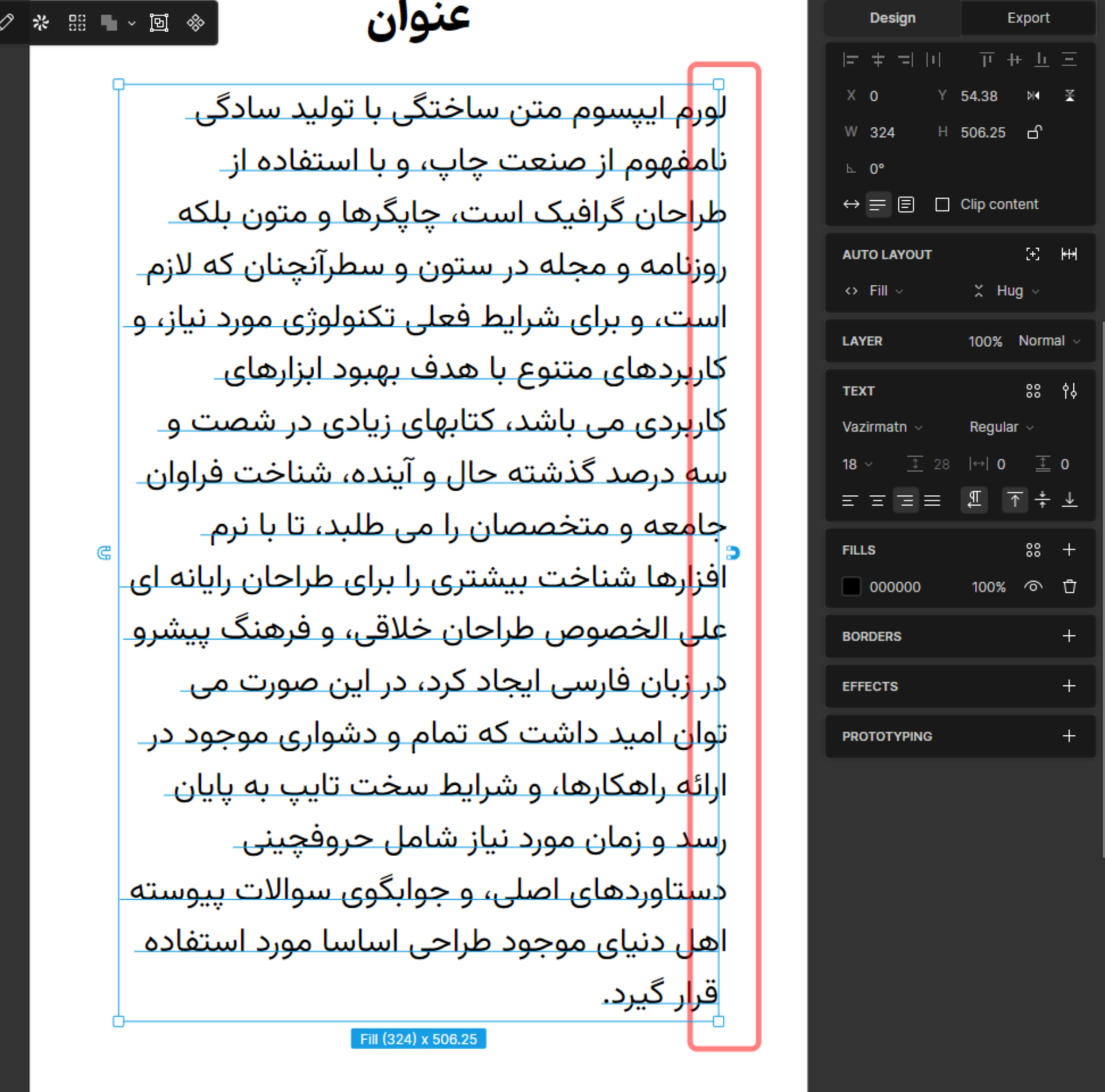
When using Persian or Arabic text in a text box with Right Align or Justify alignment, the beginning of each line extends slightly outside the text box boundaries. This causes visual inconsistencies and layout issues during design work.
Steps to Reproduce
-
Create a text box in Lunacy.
-
Enter Persian or Arabic text.
-
Set the text alignment to Right Align or Justify.
-
Observe the beginning of each line.
Expected Result
All characters should remain fully contained within the text box boundaries.
Actual Result
A portion of the first word on each line protrudes outside the text box, causing text overflow.
Additional Information
A screenshot demonstrating the issue has been attached.
Bug 2: Incorrect Deletion Behavior for Arabic/Persian Diacritics
Description
When editing Persian or Arabic text containing diacritics such as Fatha (َ), Kasra (ِ), Damma (ُ), Shadda (ّ), and Tanween, pressing Backspace on a character that contains a diacritic removes both the diacritic and the base character simultaneously.
Steps to Reproduce
-
Create a text box in Lunacy.
-
Enter Persian or Arabic text containing diacritics (e.g., Fatha, Kasra, Damma, Shadda, or Tanween).
-
Place the cursor immediately after a character that contains a diacritic.
-
Press Backspace once.
Expected Result
The first Backspace press should remove only the diacritic mark while preserving the base character.
Actual Result
Both the diacritic mark and the associated character are deleted at the same time.
Additional Information
A video demonstrating the issue has been attached for easier reproduction and verification.