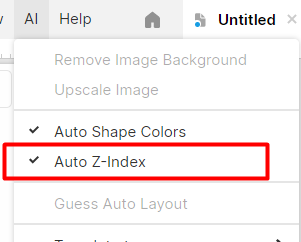
I’m not sure if this is an issue or not but when I click and drag an object over another it seems to get moved to the back. Am I doing something wrong? Is there a setting to keep it from shifting to the back?
I checked more thoroughly, it seems it only happen when Frames are involved. Dragging a shape inside a frame makes it reorder as child in the Z-index (and the other way around too). Even with “Auto Z-Index” unchecked.
I don’t know if this is expected… but it’s very annoying
Very often, I want a shape to be placed just at the border of a frame so only a small fraction of the shape is visible. And it pops the shape out of the frame… I have to put it back manually. Very confusing and time consuming
Whether the shape moves outside or inside the frame depends on your cursor position. If you grab the part of the shape that remains within the frame, everything should work correctly.