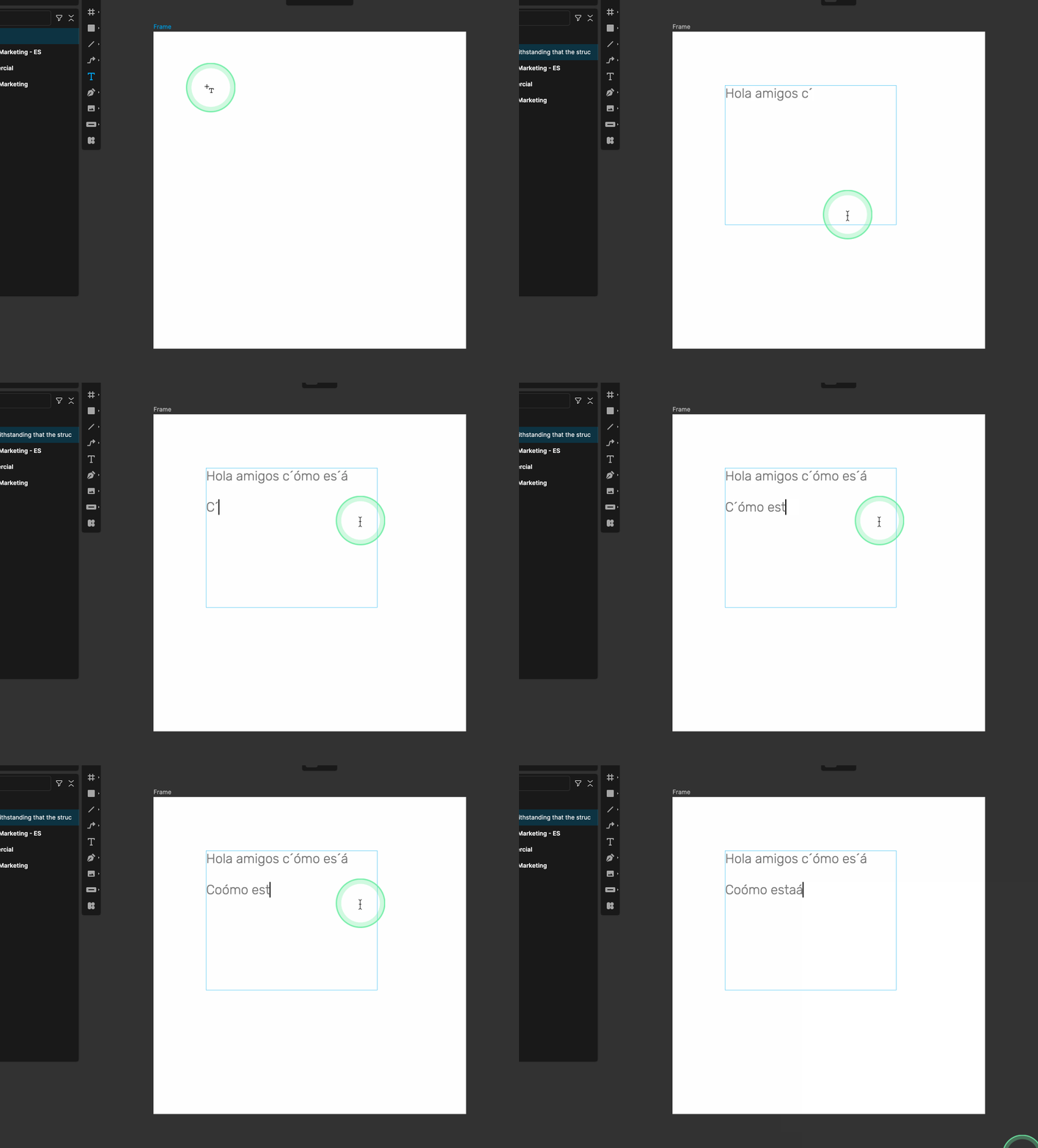
Lunacy version: 12.0.0.18324
OS version: MacOS Sequoia 15.7.1
In MacOS with a US-Latin American keyboard, the keystrokes to add special characters are either:
- Combination of “´” + vowel ( ´+ a = á)
- Long press a character and select a variation (long press “o” + 7 = ø)
In both cases, Lunacy’s Text Tool implementation is broken, effectively making it difficult to work with text in languages dependent on modifiers. I’ve found some situations:
Example 1
Type “Emoción”
Method 1 renders “Emoci´ón” (keeps an additional tilde character)
Method 2, long press “o” + 1 renders"Emocioón" (It does not clear the unmodified character)
Example 2
Type “Cómo están”
Method 1 renders “C´ómo es´án” (keeps an additional tilde character and deletes the previous consonant)
Example 3
Type “Äpfel, Brötchen und Käse”
Method 1 (using option+u+vowel) gives Äpfel, Brötchen und Käse, works as expected.
Method 2 yields “AÄpfel, Broötchen und Kaäse”
If you then click the text box to fix the issue it deletes the last character, furtherly increasing the frustration with the software. If you line break or hit spacebar after typing no issue is detected.
This issue does not happen in any other app in the MacOS ecosystem.